How AI Is Changing the Way We Edit Video
Editing used to mean hours on a timeline, scrubbing through footage frame by frame. A new generation of AI-assisted tools is replacing that with something closer to a conversation.
For most of video editing’s history, getting better at it meant one thing: learning software. Cutting on the beat, trimming dead air, layering captions, matching color between clips — all of it lived inside a timeline interface that took real time to master, no matter how good your raw footage was.
That’s starting to change. A wave of AI-assisted editing tools has moved a lot of the mechanical work out of the timeline and into plain language. Instead of manually scrubbing through an hour of footage to find the ten good seconds, you can describe what you want and let the software do the searching, trimming, and assembling.
From Timelines to Prompts
The shift is easiest to see in three tasks that used to eat the most editing time:
- Finding the good parts. AI transcription lets you search footage by what was said, instead of scrubbing by eye.
- Cutting silence and filler. Automated tools detect dead air, long pauses, and filler words and remove them in one pass rather than hundreds of manual cuts.
- Captioning. Auto-generated, styled captions that used to take an editor twenty minutes per minute of footage now take seconds.
None of this replaces creative judgment — pacing, tone, and story structure are still decisions a person makes. What’s changed is how much of the repetitive setup work stands between an idea and a finished video.
What “AI Editing” Actually Means Right Now
It’s worth being precise about what these tools do well versus what they don’t. Most AI-assisted editors are strongest at:
- Removing silences, ums, and dead space automatically
- Generating accurate, styled captions and subtitles
- Suggesting cuts based on a script or transcript
- Basic color and audio leveling across clips
- Resizing and reformatting a single edit for different platforms
They’re weaker at the things that still benefit from a human eye: knowing which take had the better energy, deciding when a joke needs an extra half-second to land, or recognizing that a technically “correct” cut just feels wrong. The realistic use case isn’t “AI edits the video for you” — it’s AI handling the mechanical 80%, so a person can spend their attention on the 20% that actually needs judgment.
Trying a Prompt-Based Editor
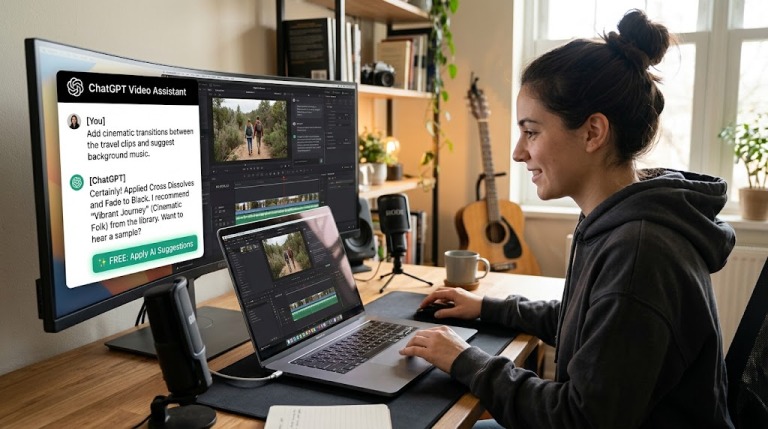
One tool that illustrates this shift well is the ChatGPT video editor free tool from CapCut. Rather than opening a traditional timeline, you describe the edit you want in plain language — trim the pauses, add captions in a certain style, cut the clip down to thirty seconds — and the tool applies it. For someone who has a folder of raw footage and no editing background, that conversational approach is often the difference between a video getting finished and sitting untouched.
A simple first workflow
Upload a raw clip, ask the tool to remove dead air and add captions, then review the result and make one or two manual tweaks. That single pass usually gets you most of the way to something postable, without ever opening a timeline.
Where AI Editing Fits Into a Real Workflow
The most effective way to use these tools isn’t to hand over the entire edit — it’s to let them do the first pass. A practical sequence looks like this:
1. Shoot with the edit in mind
Even loose footage edits faster when you’ve said the key points clearly and left natural pauses between ideas. AI tools work from what’s actually in the footage; a clean first take saves cleanup later.
2. Let the tool handle the mechanical pass
Silence removal, captioning, and rough trimming are exactly the tasks worth automating. This is where a prompt-based editor earns its place in the workflow.
3. Do a human pass for pacing and tone
Watch the automated cut back and adjust the handful of moments that need a person’s judgment — a beat that’s too fast, a transition that feels abrupt, a caption that’s technically correct but reads oddly.
4. Export for where it’s actually going
A video meant for a square feed post needs different framing than one meant for a widescreen player. Reformatting used to mean a second manual edit; most modern tools now handle this as a one-click export.
| Task | Manual editing | AI-assisted |
|---|---|---|
| Removing dead air | Frame-by-frame scrubbing | Automatic detection and cut |
| Captioning | Manual timing per line | Auto-generated and styled |
| Finding a moment in footage | Scrubbing by eye | Searchable by transcript |
| Reformatting for platforms | Separate manual edit | One-click export |
| Pacing and tone | Human judgment | Still human judgment |
The Bigger Picture
The real change isn’t that editing has gotten “easier” in some vague sense — it’s that the ratio of mechanical work to creative work has shifted. Tasks that used to require dedicated software skills are increasingly handled through plain-language prompts, which lowers the barrier for anyone who has something worth showing but never had the time to learn a timeline editor.
That doesn’t make editing judgment obsolete. If anything, it puts more weight on the parts AI still can’t do: knowing what story you’re telling and when a cut serves it. The tools have just gotten out of the way faster.
Frequently Asked Questions
- Do AI video editors replace the need to learn editing?
- Not entirely. They handle repetitive mechanical tasks well — silence removal, captions, rough cuts — but pacing, tone, and story decisions still benefit from a human pass.
- Is prompt-based editing good enough for finished content?
- For many short-form videos, a first AI pass plus a quick manual review is enough to produce something publishable. More complex projects still benefit from additional manual refinement.
- What kind of footage works best with AI editing tools?
- Clearly spoken footage with natural pauses between ideas tends to edit most cleanly, since most tools rely on transcription and speech patterns to find cut points.
- Can I still make manual adjustments after an AI pass?
- Yes — the most effective workflow treats the AI pass as a rough cut, not a final one, leaving room for a short manual review afterward.